Enterprise agent infrastructure
Make your enterprise agent-ready.
Put AI to work across the software your business already runs—from SaaS and internal tools to mainframes and green-screen terminals. Monarch builds and maintains the application actions your agents need to complete the work.
Bring the agents you already use, or build your own.









Monarch Benchmarks
Complete more work with the same models.
All three frontier models improved across 591 business workflows in Monarch's AutomationBench runs.
Read the results and methodology- Opus 5
- +23%
- GPT-5.6 Sol
- +11%
- Kimi K3
- +11%
Relative improvement in completed workflows with Monarch.
How Monarch works
Turn your existing software into tools your agents can use.
Your team knows the task: enter an order, update an account, or check a transaction. Monarch maps the application steps and builds an action your agents can call—including when those steps run through a terminal.
01 · Discover the application
- Screens & network calls
- Inputs & dependencies
- Rules & permissions
02 · Build the Product Graph
03 · Query. Act. Repeat.
Illustrative workflows
Start where the work gets stuck.
Three examples of how agents carry approved work across the business.
Customer operations
Resolve a billing issue.
“Investigate why this customer's bill increased.”
- Customer recordsRetrieve the account and complaint
- Meter dataCheck readings and tariff changes
- Billing systemApply the approved correction
The customer receives an explanation and the account reflects the approved resolution.
Read the billing investigation guideFinance
Resolve an invoice exception.
“Find out why this invoice is on hold.”
- Invoice systemRetrieve the invoice and hold reason
- PurchasingMatch the order and delivery records
- Finance systemRoute the correction for approval
Your finance team receives the matched evidence and the next action, with approval kept in the workflow.
Read the invoice exception guidePeople & IT
Complete an employee departure.
“Carry out this approved departure.”
- HR systemConfirm the person and departure date
- Identity & appsRemove the approved access
- Work recordsRecord handover and completion
Access removal, handover, and records are tracked across systems, with exceptions returned to the right team.
Read the employee offboarding guideMainframes & terminals
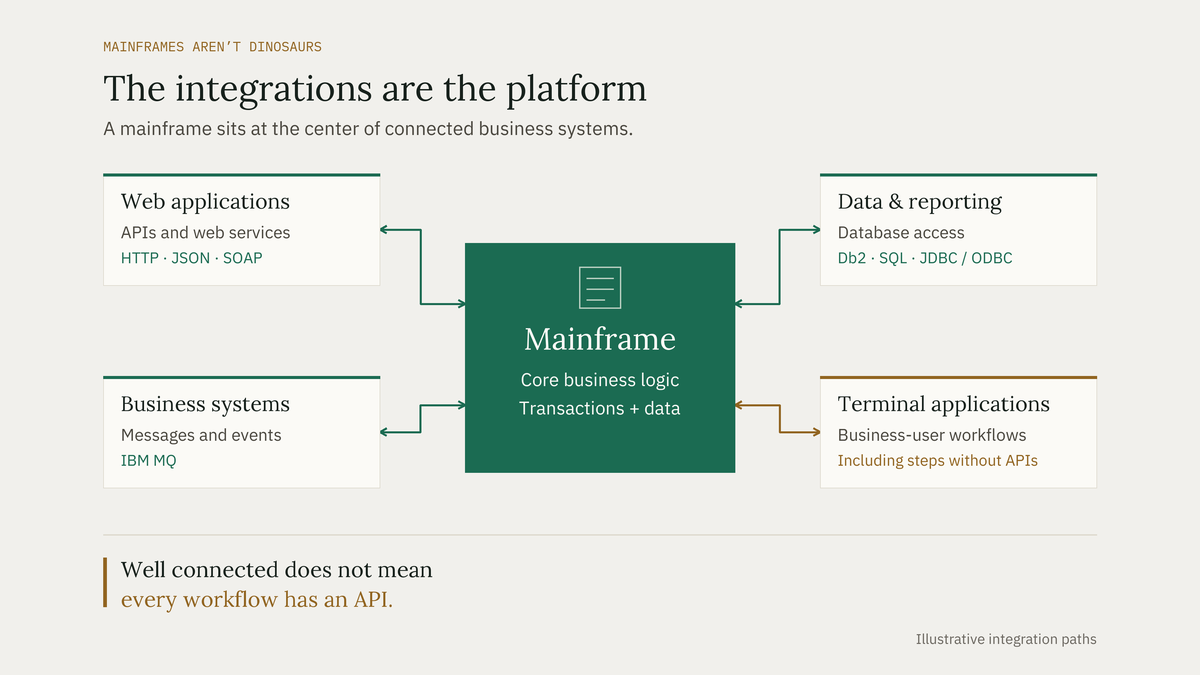
Don’t replatform your mainframe to deploy AI.
Your team still opens terminal screens, enters the same fields, and checks that each transaction went through. Bring us that workflow. We’ll work with your application owner to make it callable by your agents.
Explore mainframes & terminals
Across your business
Put AI where it makes a difference.
See how agents can take on the operational work behind your customers, teams, and services.

Healthcare
Prepare authorizations, confirm eligibility, and follow up on claims.
Explore healthcare
Energy & Utilities
Resolve billing issues and coordinate work across assets and field teams.
Explore energy
Financial Services
Prepare credit reviews, deliver hardship support, and progress claims.
Explore financial services
Airlines
Coordinate disrupted journeys, baggage cases, and maintenance follow-up.
Explore airlines
Professional Services
Connect travel, expenses, and engagement work so your people can focus on clients.
Explore professional services
Telecommunications
Recover stuck orders and keep provisioning, billing, and customer records aligned.
Explore telecommunicationsBy team
Start with the work on your desk.
Your cloud, your models, your controls.
Choose hosted or customer-cloud deployment, use your approved models, and set the actions each agent can take. Keep approvals and action records within your governance. Your team provisions the service account and controls its permissions.
Ideas for the work ahead
Building the enterprise with AI.
Let's put AI to work in your business.
Bring us a workflow your team knows well. We'll work through the systems, the approvals, and what a successful result looks like.
See your first 30 days with Monarch