
There’s a growing call to secure your agents heard from both the infosec community and agentic tool providers (looking at you, Microsoft). This is a broad push with some good arguments but also some nuanced points that I’d like to address. But also, there’s very little guidance at an architectural level on what this actually means in practice. If you’re in a position like mine, you’re probably inundated with sales outreach pushing one solution or another. In addition, perhaps (like me) you’ve read guidelines or attended webinars containing an overwhelming amount of detailed information about how to secure a family of solutions (looking at you, Microsoft). The last one I joined was two hours of clarification about a massively sprawling and quickly changing set of products, none of which are secure by default.[1]
The threats
There is a trend in the industry to fixate on existential threats and threats from agents and from models. This is a real issue, but in enterprise use it's outweighed by more urgent issues of agents oversharing and leaking data. So I consider the popular arguments about treating agents as compromised to be a partial miss, which I addressed in my previous post We’re thinking about AI safety all wrong.
The common thread
The places we agree, though, are my focus for the controls discussed in this article:
- Detecting agent mistakes
- Preventing agent mistakes
- Data integrity risks
- Data privacy and loss protection
- Business continuity and data availability
Translating this into architecture
A small collection of components is sufficient to provide these safety measures today: controls outside the model that monitor, limit, and contain what the model does, and that can prevent damaging mishaps like leaks before they occur. Here I present a high-level diagram of an agent and the controls you may wrap around it to secure it, based on common techniques and available technology in fall 2026. Some of these techniques and components are available in a variety of platforms, sometimes integrated with a given LLM provider or agent platform, and sometimes as an independent service. I’ll list some of the common solutions for each component as we go.
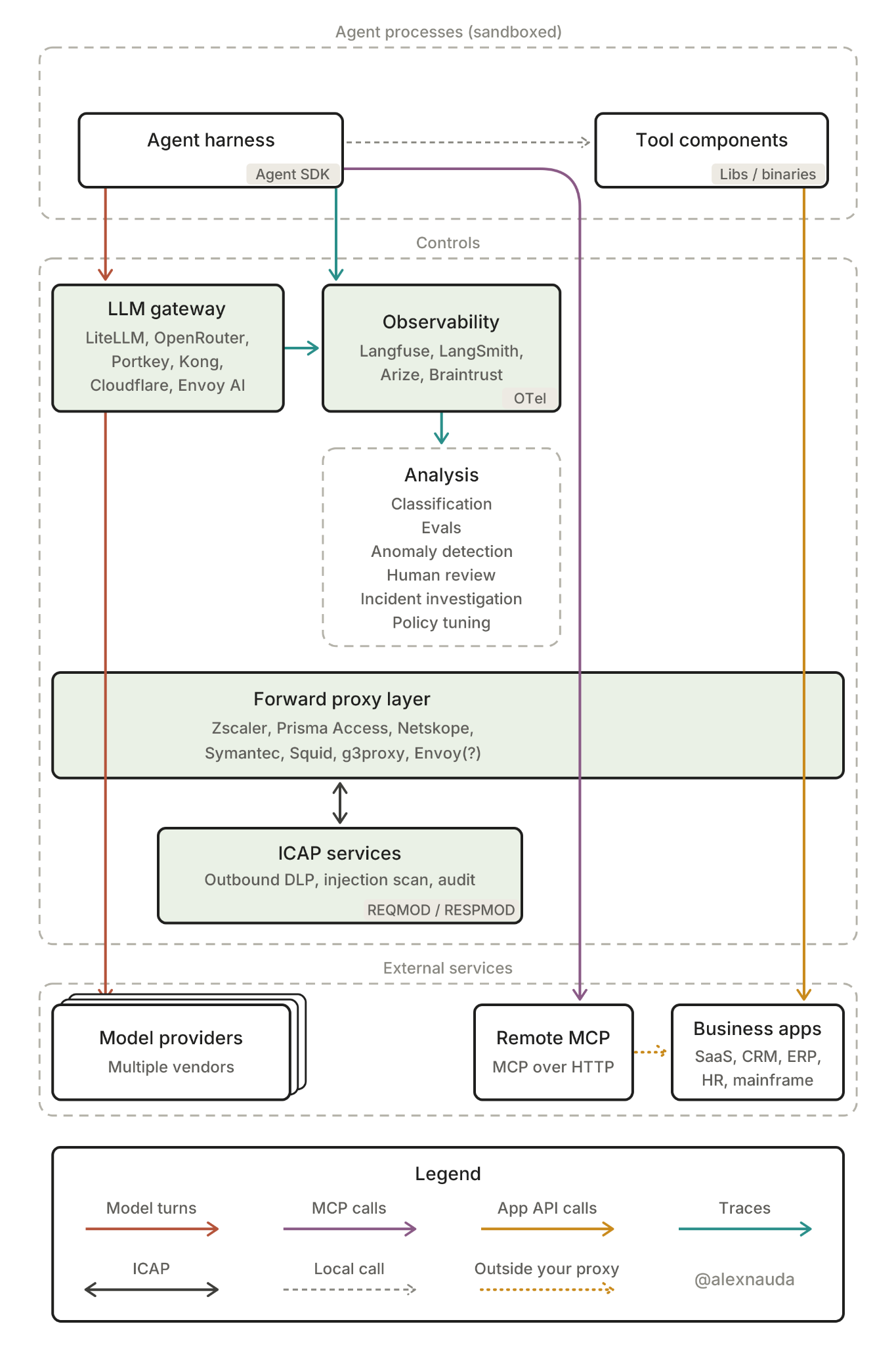
Using commonly available components, the architecture typically includes:
- Your agent processes, which should run sandboxed (isolated from the OS where each is hosted):
- Agent harness: runs the agent loop, sends model turns, and dispatches tool calls. This is the component whose behavior the rest of the diagram observes and constrains. This architecture could be used for coding harnesses, but in this case I’m focusing on agentic product features built around LLMs and autonomous agents. Technologies used in this space include things like Claude Agent SDK, OpenAI Agents SDK, and LangGraph; claws such as OpenClaw and Hermes Agent; and many more.
- Tool components: the code that actually reaches business systems on the agent’s behalf, called in-process by the harness, so their network traffic is the main target for DLP. This would include whatever your agent harness has access to, installed or available in its runtime environment, in order to do its work. This typically includes in-house libraries, vendor SDKs, and binaries that call business-app APIs.
- External services:
- Model providers: the inference itself. Trusted by contract and hosting choice, though outbound DLP still applies to what’s sent to them. Examples: Anthropic, OpenAI, Google, plus cloud-hosted access to those and other models through AWS Bedrock, Azure AI Foundry, Google Vertex AI, and other inference providers such as Baseten, Fireworks, and many others. (Your company may also self-host inference, but in this example I’m treating these as external services.)
- Remote MCP: hosted tool servers that expose business-app operations over HTTP. The proxy sees the MCP exchange but not the server’s own onward calls. Includes vendor-hosted MCP servers for the business apps (or your own MCP servers deployed over Streamable HTTP).
- Business apps: The systems of record and services that your agent can take actions in, whether read-only or read-write, where data integrity, privacy, and availability are at stake. This can include many internally developed services as well as traditional SaaS applications and ERPs like Salesforce, SAP, Workday, ServiceNow, and Microsoft 365. This also may include applications running on IBM z/OS mainframes and other legacy platforms.
- Controls:
- LLM gateway: a single endpoint for model traffic, with routing across providers, centralized keys, rate and cost limits, and in some products guardrails on prompts and responses. These products generally only see model turns. Examples: LiteLLM, OpenRouter, Portkey, Kong AI Gateway, Cloudflare AI Gateway, Envoy AI Gateway, etc.
- Observability: records each agent run as a trace of model calls and tool steps, out of the request path, so it supports reconstruction and review but typically can’t block anything. Examples: Langfuse, LangSmith, Arize, and Braintrust (OpenTelemetry for instrumentation).
- Analysis: turns traces into findings and improvements, both for agent quality and for tuning the controls. Includes classification, evals, anomaly detection, human review, incident investigation, and policy tuning (mostly features of the observability platforms, plus your own pipelines).
- Forward proxy layer: the single egress point for all agent traffic, with TLS interception, domain allow and deny tiers, category blocking, and a per-request audit log. Hands content to ICAP services for inspection. Examples: Zscaler, Prisma Access, Netskope, Symantec, Squid, g3proxy, and Envoy.
- ICAP services: content inspection called by the proxy, with outbound DLP (secrets, PII, and code) on requests and injection scanning on responses, returning allow, block, or modify. Examples: Proofpoint, Symantec DLP, Forcepoint, and many LLM-specific scanners (injection, secrets, and PII) as additional services.
[1] The list of what you may have to secure just for Microsoft’s AI (wait, sorry, “SI”) product offerings:
(No joke.)
Copilot surfaces
- Microsoft 365 Copilot, Copilot Chat, Copilot in Word, PowerPoint, and Excel
- Copilot Home, Code, and Autopilot (the new harness announced Sept 25; GitHub Copilot moves into Code)
- Autopilot (formerly Copilot Scout), in cloud and endpoint versions
- Copilot Cowork, now metered
- WorkIQ, web grounding (public web on/off), auto model selection, and Anthropic models in Copilot
- Copilot control system (admin settings)
- Security Copilot (add-on)
Agent building
- Agent Builder (Copilot Studio Lite), Agent Store
- Copilot Studio (formerly Power Virtual Agents): actions, plugins, deterministic workflows, triggers, autonomous agents, publish/deployment path, and viral license
- SharePoint agents
- Multi-agent flows
- Azure AI Foundry (bring your own model, knowledge, and agent)
- M365 Agents Toolkit and SDK
- Graph connectors, website connectors, custom APIs, and MCP servers (including authenticated MCP)
Power Platform
- Power Automate, Power Apps, Power Pages, and Power Platform connectors
- Dataverse
- Environments (default vs managed), environment routing, and maker sandboxes
- Connector/DLP policies per environment, now blocked by default with a request flow
- On-premises data gateway, Power Platform admin center
- Dynamics 365, Azure Logic Apps
- PL-900 certification
Identity
- Entra ID, Entra Agent ID (agent identities), and agent blueprints
- Conditional access, PIM, and PIM groups
- Roles: Global Reader, Security Administrator, and Compliance Administrator
- Entra Suite
Agent 365
- Agent registry, registry sync, visibility into agent prompts/instructions, bulk blocking of third-party agents and connectors, and $15/user/month add-on
Purview
- Sensitivity labels, DLP for Copilot, unified audit log, DSPM (formerly DSPM for AI), AI baseline assessment, eDiscovery Premium, and endpoint DLP
Defender and Sentinel
- Prompt injection protection, Safe Links, Safe Attachments, and runtime protection
- AI security portal (ai.security.microsoft.com), AI agent discovery
- Defender for Endpoint
- Defender for Cloud Apps connectors (M365 and Azure)
- Sentinel (moving into Defender), KQL alerts
Other Microsoft
- SharePoint, SharePoint Advanced Management, OneDrive, Exchange (Copilot restricted to internal email), Teams, Teams admin center, Teams developer portal (dev.teams.microsoft.com), Intune, and M365 admin center
Licensing
- E3, E5, E7 (about $99/month), Copilot add-on, Copilot Studio license, metered credits, and G5/G7